A Chrome Extension That Talks to Your Database
Cosmos DB Sidekick is a Chrome extension built with the GitHub Copilot SDK and the Azure Cosmos DB JavaScript SDK. The GitHub Copilot SDK lets you embed Copilot’s AI capabilities directly into your apps — available for Go, Python, TypeScript, and .NET.
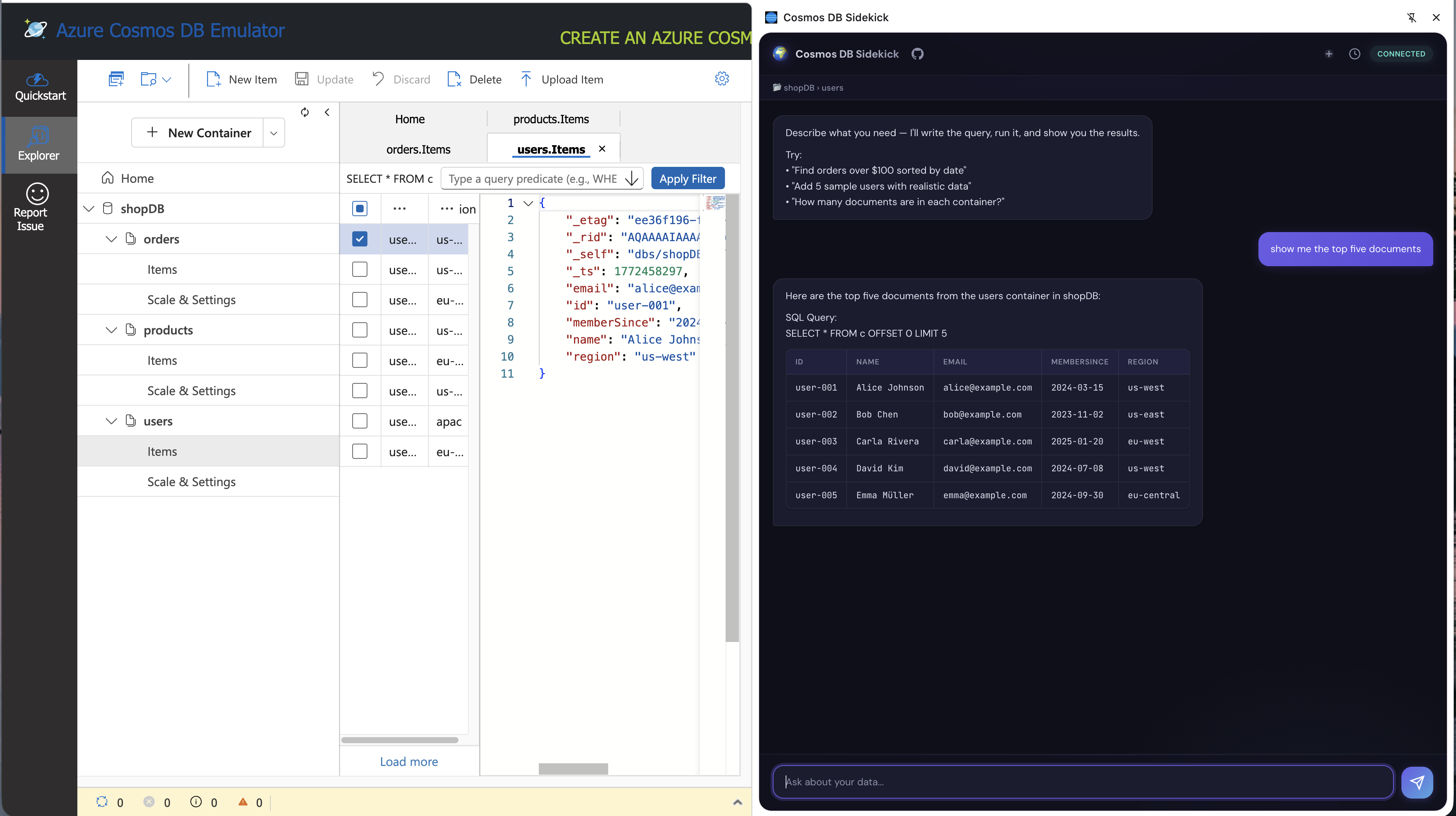
It sits alongside the Cosmos DB vNext emulator Data Explorer and lets you ask questions in plain English. It writes the queries, runs them, and shows results. No copy-pasting SQL, no switching between tabs.
You can find the code on GitHub.
Here is a demo of the app in action:
What can you actually do with it?
Use natural language to query data. In response to something like “Find all orders over $100 from the last month” — the extension figures out the schema, generates a SQL query, runs it against your emulator, and streams back the results.
Write data too. Need test data? Ask it to “Add 10 test users to the users container” and it generates realistic documents with proper id fields and partition keys, then upserts them.
It knows what you’re looking at. When the Cosmos DB Data Explorer is open, the extension auto-detects which database and container you’re browsing. A context bar shows something like 📂 ordersDb › customers, and your questions automatically target that data. Switch to a different container in the Data Explorer — the context follows.
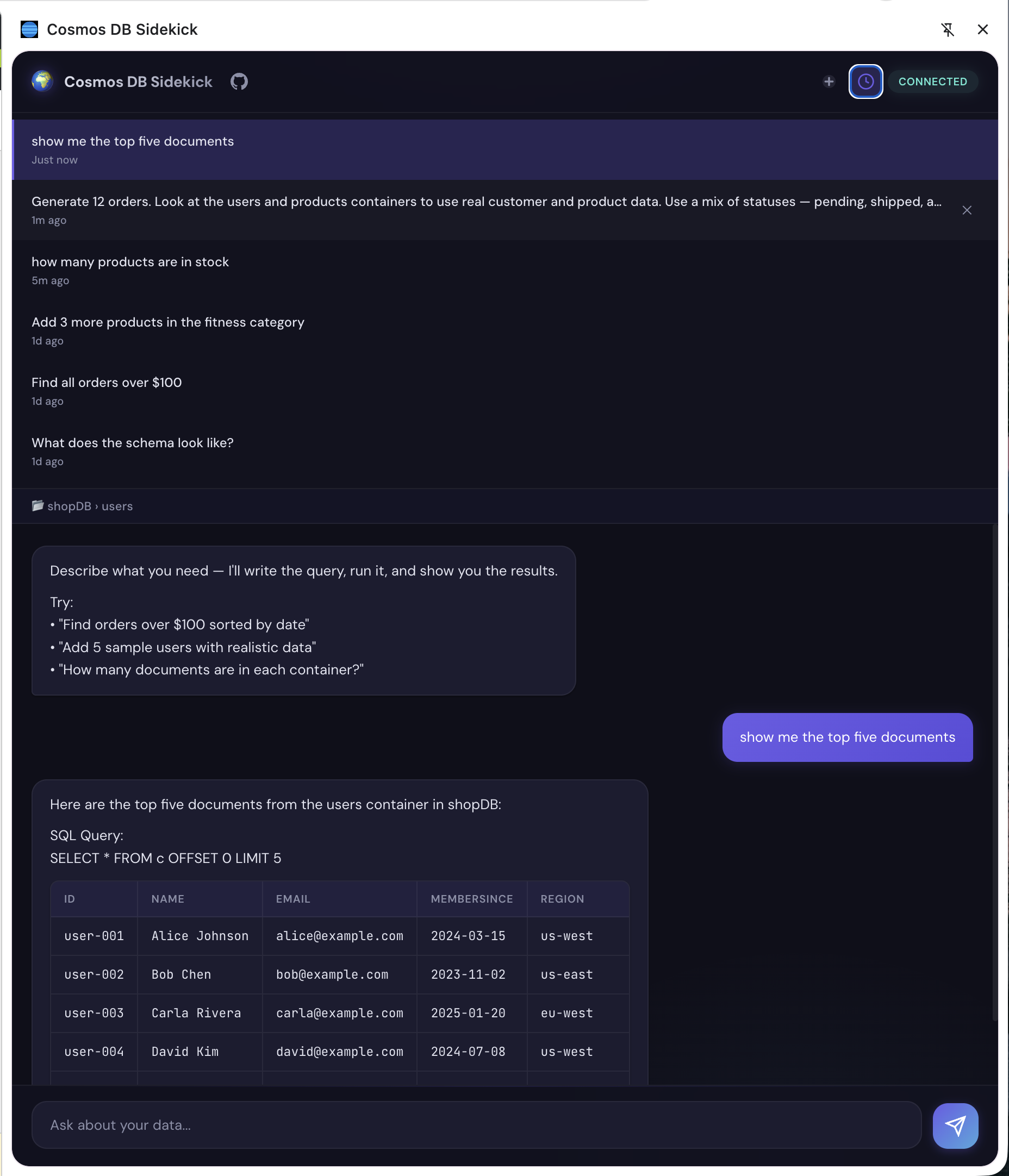
Conversations persist. You can have multi-turn conversations, switch between sessions, and pick up where you left off. Close the side panel, reopen it — your chat history is still there.
How the Copilot SDK makes this work
Under the hood, the extension is powered by the GitHub Copilot SDK. The architecture is straightforward:
┌─────────────────────┐
│  Chrome Extension   │
│    (side panel)     │
└────────┬────────────┘
         │ HTTP + SSE
┌────────▼────────────┐       ┌──────────────────────┐
│   Node.js Sidecar   │──────▶│  GitHub Copilot SDK  │
│                     │◀──────│  (LLM + tool calls)  │
└────────┬────────────┘       └──────────────────────┘
         │ Cosmos DB JS SDK
┌────────▼────────────┐
│  Cosmos DB vNext    │
│     Emulator        │
└─────────────────────┘
The sidecar is a lightweight Node.js server that acts as the bridge. It creates a CopilotClient, manages chat sessions, and, (most importantly) defines tools that the LLM can call autonomously. Tools are the key to the agentic behavior — they let the model interact with the external world (in this case, your Cosmos DB instance) in a structured way:
list_databases— discover what databases existlist_containers— see containers and partition keys in a databasesample_documents— grab sample docs to understand the schemarun_query— execute a read-only SQL queryupsert_items— insert or replace documents
For example, what happens when you ask a question like “What does the schema look like?”. You didn’t tell it which database to query. You didn’t tell it to sample documents. But the LLM chains the tools together on its own — lists databases, picks the one from your context, lists containers, samples documents, then describes what it found. That’s the agentic part.
Same applies to query generation and execution - you define the tools, the SDK handles the orchestration, and the model decides the sequence.
Here’s what a tool definition looks like (simplified):
{
  name: "run_query",
  description: "Execute a read-only SQL query against a Cosmos DB container.",
  parameters: {
    type: "object",
    properties: {
      database:  { type: "string", description: "The database name" },
      container: { type: "string", description: "The container name" },
      query:     { type: "string", description: "The SQL query to execute" },
    },
    required: ["database", "container", "query"],
  },
  handler: async (args) => {
    return await runQuery(args.database, args.container, args.query);
  },
}
The SDK takes care of the rest — passing tool definitions to the model, routing tool calls to your handlers, feeding results back into the conversation, and streaming the final response.
Streaming is built into the session. The sidecar subscribes to session events and forwards them over SSE to the Chrome extension, so responses appear token-by-token in the chat panel. Creating a streaming chat session is a few lines:
const session = await client.createSession({
  model: "gpt-4.1",
  systemMessage: { mode: "append", content: SYSTEM_PROMPT },
  tools: getTools(),
  streaming: true,
  onPermissionRequest: approveAll,
});
Session persistence comes for free too. The SDK’s listSessions() and resumeSession() let the extension show chat history and restore previous conversations — the sidecar doesn’t need its own storage layer.
Context-aware — no configuration needed
The extension watches which database and container you have open in the Data Explorer and automatically uses that as context. Ask “show me the top 10 documents” and it knows exactly where to look — no need to specify the target every time.
Try it out
The whole thing runs locally — Chrome extension + a Node.js sidecar + the Cosmos DB vNext emulator in Docker. You’ll need GitHub Copilot and the Copilot CLI set up for auth.
Follow the steps in the GitHub repo to get it running, and start chatting with your database in natural language. It’s a fun demo of how the GitHub Copilot SDK can turn a simple extension into an intelligent agent that understands your data and helps you interact with it seamlessly.
The bigger picture
Cosmos DB Sidekick is one specific use case, but the pattern behind it is general. Define a few tools, hand them to the Copilot SDK, and you get an agent that can reason about when and how to use them — chaining calls, handling errors, and streaming results back to the user. The SDK handles sessions, tool orchestration, and model access; you just bring the domain logic.
That same pattern works for any data source, any API, any workflow. A CLI that talks to your CI/CD pipeline. A Slack bot that queries your observability stack. A dashboard that lets non-technical teammates explore production metrics in plain English. The building blocks are the same: tools, a system prompt, and a session.
If you’re looking for a starting point, the Copilot SDK has samples for Go, Python, TypeScript, and .NET. Pick your stack and start building.