AI agents, meet the Azure Cosmos DB vNext emulator
If you use the Azure Cosmos DB vNext emulator, you probably know the local development loop: start the emulator, connect to it, create some resources, load test data, run queries, and inspect the results. Each step is straightforward, but together they add setup work before you can test the application you are actually building.
How agents work with the emulator
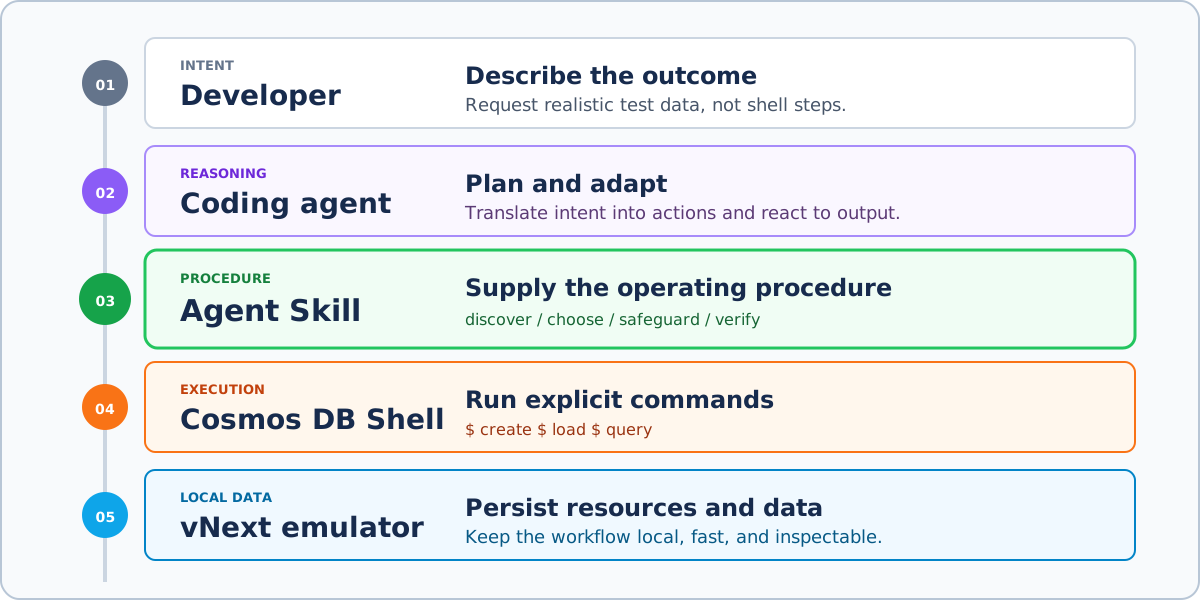
How a developer’s intent flows through the coding agent, Agent Skill, Cosmos DB Shell, and local emulator.
The emulator includes Cosmos DB Shell, an open-source CLI for working with databases, containers, and items. It runs inside the emulator container and handles the local endpoint and well-known key, giving developers a direct, scriptable way to work with the emulator.
CLIs are well suited to agent workflows because they expose operations as explicit commands and return results the agent can inspect. An agent can discover commands through built-in help, run them non-interactively, respond to errors, and use the output to choose its next action. These characteristics make the CLI a practical interface for agents. Cosmos DB Shell brings that model to the local emulator.
For example, an agent can run Cosmos DB Shell non-interactively inside the emulator container:
docker exec <emulator-container> cosmoshell.sh -c '<command>'It gives AI coding agents, such as GitHub Copilot CLI, Codex, and Claude Code, a straightforward way to work with the emulator. The developer describes the required outcome instead of translating the task into a sequence of shell commands. Command access is only the starting point. The agent still needs an operating procedure for finding the emulator, choosing appropriate commands, respecting safety boundaries, and verifying its work.
An Agent Skill fills that gap by packaging task-specific guidance for reuse across requests and sessions. For the local emulator, the cosmosdb-emulator-vnext skill helps the agent inspect resources, create databases and containers, load test data, and run queries through Cosmos DB Shell.
Explore the skill on GitHub: cosmosdb-vnext-emulator-skill
From prompt to local test data
Consider a developer building a multi-tenant order-processing application. The integration tests need data across multiple tenants and different stages of the order lifecycle. Creating and maintaining that data by hand can quickly become tedious.
Instead, the developer could give a coding agent this prompt:
I’m building a multi-tenant order-processing app and need realistic data
for integration testing. Set up my local Cosmos DB emulator with synthetic
orders covering two tenants and a mix of new, shipped, and cancelled orders.
Show me the data when it’s ready.
I tested this prompt with GitHub Copilot CLI while the local emulator was already running. The agent located the emulator, used the bundled Cosmos DB Shell, and created OrdersDB with an Orders container partitioned by /tenantId.
It then generated a balanced set of synthetic orders for both tenants. Each order included customer details, nested line items, timestamps, shipping information, and totals. It also added status-specific fields, such as tracking information for shipped orders and cancellation reasons for cancelled ones.
The setup summary showed what the agent created:
Database: OrdersDB
Container: Orders
Partition key: /tenantId
Orders created: 12
To verify the data, the agent queried the container. Six of the 12 orders are shown below:
| Order | Tenant | Customer | Status | Total |
|---|---|---|---|---|
| ord-a001 | tenant-alpha | Alice Navarro | new | $145.96 |
| ord-a003 | tenant-alpha | Clara Mendes | shipped | $361.99 |
| ord-a005 | tenant-alpha | Elena Vasquez | cancelled | $129.00 |
| ord-b001 | tenant-beta | Grace Osei | new | $74.97 |
| ord-b003 | tenant-beta | Ingrid Sorensen | shipped | $249.00 |
| ord-b006 | tenant-beta | Luca Ferrari | cancelled | $101.97 |
Because the request is open-ended, names, values, and document counts may vary. The workflow remains the same: create the resources, load the data, and query it back. Showing the saved orders confirms that the data is in the emulator and ready for the application to use.
At this point, the developer has persisted, partitioned data for integration testing without writing a seed script or manually assembling documents.
Notice that the prompt describes the application need, not the operating procedure. It says nothing about finding the emulator, using the bundled shell, choosing non-interactive commands, or verifying changes.
Why use an Agent Skill
You could include all of those operating instructions in every prompt. That works for a one-off task, but repeating the same guidance soon becomes tedious. Results can also vary when an important constraint is omitted or phrased differently.
Moving the guidance into global instructions avoids that repetition, but makes emulator-specific context available during unrelated tasks.
An Agent Skill avoids both tradeoffs. The cosmosdb-emulator-vnext skill keeps the emulator guidance in one place and makes it available when a relevant request is detected. As a Markdown file, the skill can be shared, reviewed, tested, versioned, and adapted to a team’s conventions or testing workflow.
The same approach extends to other parts of Cosmos DB development. The Azure Cosmos DB team maintains the Cosmos DB Agent Kit, a collection of skills for AI coding agents working with Cosmos DB. It includes guidance on data modeling, partition-key design, query optimization, SDK usage, indexing, throughput, security, and monitoring.
The emulator skill may also be combined into the Agent Kit and maintained there alongside other Cosmos DB skills.
Try it yourself
Agent Skills are a lightweight, open standard that lets you reuse the same skill across coding agents.
Install the skill and put it to work with your local emulator:
npx skills add abhirockzz/cosmosdb-vnext-emulator-skillThen run the order-processing prompt above to create your first test dataset. From there, adapt the request to the data and workflows your application needs.
Together, the local emulator, Cosmos DB Shell, and the skill make this kind of setup repeatable without hiding how the work gets done. Developers can describe the data they need while the agent runs explicit commands, verifies the result, and leaves an execution trail they can inspect.